

Stream from the controller you already have, and from anything that speaks RTMP.
You do not need a controller with HDMI out, or a video transmitter. LiveProtocol receives RTMP over the network — from the controller that came in the drone’s box, from a phone, from OBS on a laptop — and puts the clean image on a second monitor.
No account · no card · signed and notarised by Apple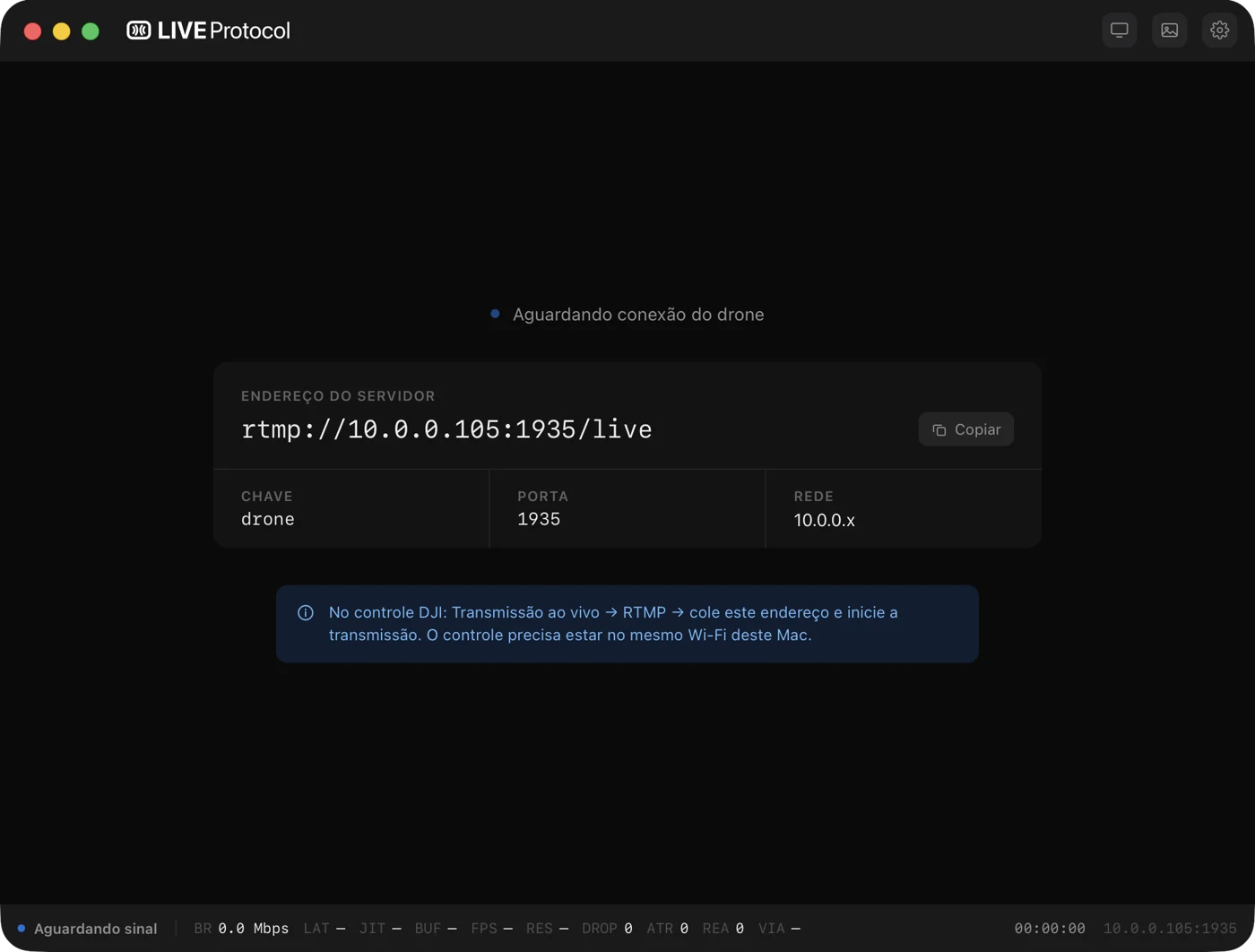
It works with the gear you already have.
To put a drone’s image on a monitor, the known route is a controller with HDMI out — DJI Smart Controller, RC Pro, the Inspire 2 controller. They are expensive, and not having one is why many people turn down this kind of job. LiveProtocol takes the other route: the live stream the drone app already does, over the network. It works with the ordinary controller, the one that comes in the box.
The controller decides, not the drone.
The stream comes out of the app — DJI Fly or DJI GO 4 — so what matters is whether the controller can stream.
These stream
- RC-N1, RC-N2, RC-N3 — with your phone, the controller that comes in most combos
- DJI RC 2 — built-in screen
- DJI RC Pro
- DJI Smart Controller
This one does not
- DJI RC — the plain-screen one, which comes in Mini 3 Pro, Mini 4 Pro and Mavic 3 Classic combos. It has no RTMP streaming. With it, use the RC-N with a phone.
You need
- DJI Fly 1.4.12 or newer, or DJI GO 4 on the older drones
- The controller on the same network as the Mac
Drones that stream live.
Practically every consumer DJI drone of the last few years, and the older ones through DJI GO 4.
Through DJI Fly
- Mini 2, Mini SE, Mini 3, Mini 3 Pro, Mini 4 Pro, Mini 5 Pro
- Air 2, Air 2S, Air 3, Air 3S
- Mavic 3 and Mavic 3 Pro, Mavic 4 Pro
- Neo, Avata, Avata 2, Flip
Through DJI GO 4
- Mavic Pro, Mavic 2 Pro and Zoom, Mavic Air
- Phantom 4 and Phantom 4 Pro
- Inspire 2
Other brands
- Autel EVO II, EVO Lite and Nano — through Autel Sky or Explorer, on the custom RTMP option
- And any device that streams RTMP
And it does not have to be a drone.
The app does not know what is on the other side — it receives RTMP. There is no authentication and no fixed path: anything that publishes to the address works. A phone with a streaming app, OBS on a laptop, a desk encoder. The drone is the most common use, not the limit.
Whoever streams chooses the quality: LiveProtocol does not re-encode or crop anything, it shows what arrived. Tested receiving 4K (3840 × 2160) from a signal that came from no drone at all.
Showing the drone’s image to your client is harder than it should be.
The phone shows everything
Telemetry, battery, crosshair, recording. The client sees the cockpit instead of the shot, and the operator ends up explaining an interface instead of working.
The right gear costs a fortune
The known route asks for a controller with HDMI out, or a wireless video system — hundreds to thousands, plus a battery, plus a cable, plus one more thing to carry. That is why people turn the job down.
Over Wi‑Fi, the image stutters
Network-based solutions choke exactly when the Mac has no cable, which is the situation in the field. Stuttering, it is no good for showing anyone.
The drone streams to your Mac. The app does the rest.
Nothing to install beyond the app: the video server is built in and starts on its own when you open it.
01 · Open the app
It shows the RTMP address and the key. One tap to copy.
02 · Paste it into DJI Fly
Live streaming → RTMP. The controller on the same Wi‑Fi as the Mac.
03 · Send it to the monitor
The image appears on its own when the signal arrives. Pick the screen and it gets the clean feed, full screen.
You choose between a short delay and an image that does not stutter.
With the Mac on a cable, the video crosses the air once and arrives almost instantly. Over Wi‑Fi it crosses twice — controller → router → Mac — and arrives in bursts. The app holds a little image back to give the smoothness back, and you say how much.
The app opens on the right profile already: it detects on its own whether the Mac is on a cable or on Wi‑Fi.
What comes in the app.
Clean output on a second monitor
Full screen, no borders, no overlay at all. The cursor disappears if you want.
Fallback image
The signal drops, your image fades in. It goes back on its own when the drone reconnects — the client never sees a black screen.
Cable or Wi‑Fi profile
One choice only: less delay or an image that does not stutter. The app handles the rest.
Built-in server
Nothing to install on the machine, nothing to configure. Open it and it works.
Live meters
Bitrate, frames per second, buffer and resolution in the footer. When something looks off, the number says what.
RTSP output too
The same signal goes out over RTSP to VLC or OBS, if the job needs recording or streaming.
Mirroring the phone and LiveProtocol.
A dedicated video transmitter is still better for flying by it: its own radio, less delay, independent of any network. LiveProtocol is for the other job — putting the image in front of whoever is watching.
One purchase, no subscription.
One licence for up to two Macs. You pay once and keep using the app even after the year of updates ends.
- Permanent licence, never expires
- Use on up to 2 Macs
- 1 year of updates included
- The app keeps working after the first year
Use the whole app before deciding. The trial is good once per Mac.
- The complete app, no feature limits
- No credit card
- No account
Questions.
My controller is the DJI RC. Does it work?
Do I need a controller with HDMI out?
Can I use it without a drone, just with a phone?
Do I need to install anything else?
Can I fly looking at this image?
Why does Wi‑Fi add more delay?
What about audio?
How many Macs can I use it on?
What happens after a year?
Is there a Windows version?


Stream the clean image with no HDMI output needed.
Download LiveProtocol and do your next job with the controller you already have. 14 days, no account, no card.
Download for macOSmacOS 12 or later · Apple Silicon · signed and notarised by Apple · Version 1.0.2 · 33,2 MB